LexiFloat for Android, Windows and Linux · version 1.0.0
Privacy policy
What this app knows about you.
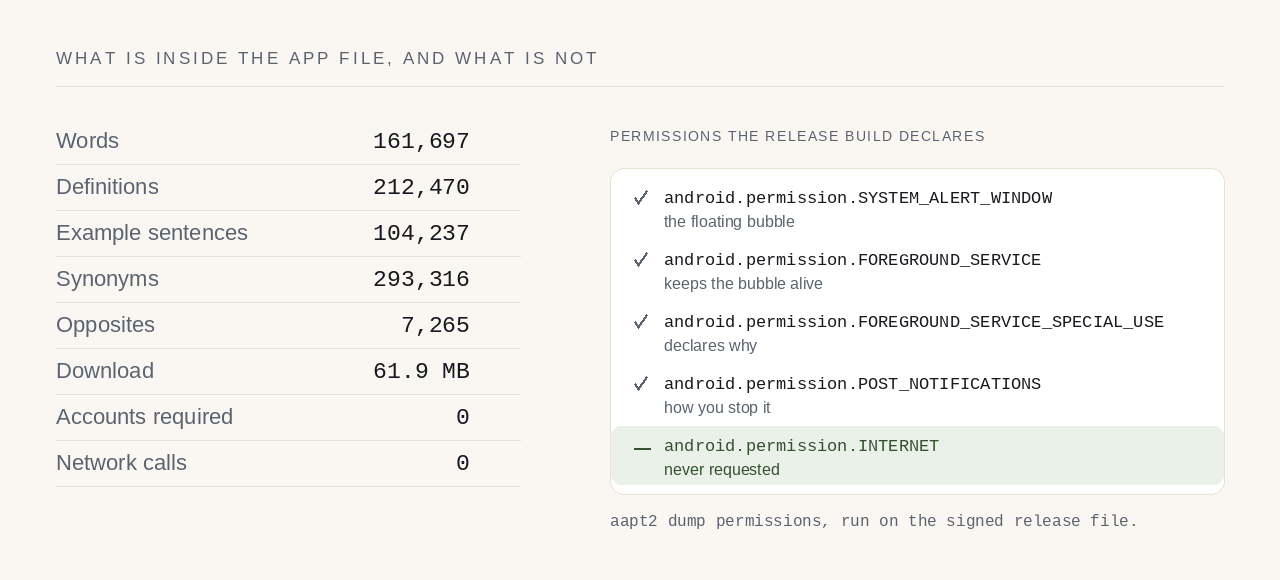
LexiFloat collects nothing, sends nothing and has no way to. The app ships without the Android internet permission, so the operating system refuses it a network connection — this is not a policy you have to take on trust, it is a restriction Android enforces on every app that does not ask for that permission.
How can you check that no data leaves the app?
Open Settings → Apps → LexiFloat → Permissions on your phone. There is no network or
internet entry, because the app never asked for one. Anyone holding the release file can
confirm the same thing with Android's own tooling: aapt2 dump permissions
lists four permissions, and android.permission.INTERNET is not among them.
What data is stored on your phone?
Three things are written to storage, all of them local to this device:
- Your notebooks — the words you looked up, the day you looked them up, and anything you typed into a note.
- Your recent lookups, the short list on the home screen.
- Your settings — theme, text size, bubble size, reading speed.
The dictionary itself is copied out of the app file on first launch and is read-only after that. None of this is transmitted, because there is nothing to transmit it with.
What about Android's own backup?
If you have Android's automatic backup switched on, the system copies your notebooks and settings to your own Google Drive, under your own account. That is Android doing it, not this app, and it is what lets your notes survive a new phone. The dictionary is deliberately left out of that backup so it does not spend your Drive quota on a file the app can rebuild. You can turn the whole thing off in your phone's system backup settings.
Does the pronunciation button send the word anywhere?
The speaker button hands the word to the text-to-speech engine already installed on your phone — usually Google's, sometimes your manufacturer's. That is a separate app with its own permissions and its own privacy policy, and some engines fetch voices over the network. LexiFloat cannot see what it does with the word. If that matters to you, do not use the speaker button.
Opening a link
The licence link on the About screen opens your browser. Your browser has a network connection; this app still does not. Nothing about you is attached to that link.
Exports
When you export to PDF or a spreadsheet, your phone's file picker asks you where to put it and the app writes it there. It goes nowhere else. If you choose a folder that syncs to a cloud service, that service has it — that is your choice and your provider's policy, not this app's.
Which permissions does LexiFloat use, and why?
- Draw over other apps — the floating bubble. Asked for only when you switch the bubble on, never at launch, and the app works fully without it.
- Foreground service — keeps the bubble alive while you are in another app.
- Notifications — shows the bubble's notification, which is how you stop it.
Children
The app is safe for any age. It collects no data from anyone, so there is nothing to treat differently for a child.
On Windows and Linux
The desktop app collects nothing and sends nothing either. Everything it writes stays on your computer:
- Your notebook — the words you looked up and your notes. Linux:
~/.local/share/lexifloat/notes.db. Windows:%LOCALAPPDATA%\LexiFloat\notes.db. - Settings and the bubble's position — Linux:
~/.config/lexifloat/. Windows: the same%LOCALAPPDATA%\LexiFloat\folder. - A small socket file that lets a second launch hand its word to the copy already running — in your session's runtime folder on Linux, in the LexiFloat folder on Windows. It is a file on your own disk, not a network connection.
In the Flatpak build the Linux files live under
~/.var/app/com.lexifloat.LexiFloat/ instead. Uninstalling the app leaves
these files in place; delete the folder if you want them gone.
The lookup hotkey reads the text you selected. On Linux it reads the selection directly and never touches the clipboard. On Windows it copies the selection with Ctrl+Insert, reads it, and then puts back the text, picture or files that were on your clipboard before (other kinds of clipboard content, such as formatted text from a word processor, are not restored). Because that copy is an ordinary clipboard copy, if you use Windows clipboard history (Win+V) or clipboard sync, the selected word appears there like anything else you copy; that history belongs to Windows, not to LexiFloat. A word that stays on screen for a few seconds is filed in that day's notebook, as on Android; you can turn that off in Settings. Nothing else it reads is kept.
Start at login is off until you turn it on. Then it adds an entry to your desktop's autostart folder (Linux, installed from the .deb) or to your user's Run list in the registry (Windows), and removes it when you turn it off. The Flatpak build does not offer it.
Network. The Flatpak build is given no network device, so the operating system prevents it reaching the internet. The Windows and .deb builds contain no code that connects to the internet and never do; the operating system does not lock them out the way the Flatpak sandbox does.
What about this website?
The website works differently from the apps. lexifloat.com uses Google Analytics to
count visits: which pages are read, the rough location of each visitor, their device
and browser, and which link brought them here. Google's script sets cookies for this
(_ga and _ga_X9X0D1GTQV) and sends that information, with
your IP address, to Google, which handles it under
Google's privacy
policy. Only totals are looked at. A content blocker or
Google's opt-out
add-on stops it, and the site works the same without it. The apps have no
analytics at all.
The site is served by Cloudflare Pages, which keeps ordinary web server logs — including your IP address — for security and abuse prevention; that is Cloudflare's processing, described in their privacy policy, and nobody here reads or analyses them. If you email the address on this site, that mail is held by the mail provider so it can be read and answered, and it is not used for anything else.
Changes to this policy
If this ever changes, the date at the bottom of this page changes with it and the new text ships in an app update. A version of LexiFloat you have already installed cannot have its policy altered underneath it.
Who to ask
Questions about any of this go to official@randomly.online. The app is published by Dhruba Singha Roy.
· Dhruba Singha Roy